Profiling using JRockit Flight Recorder (Please switch on Flight Recorder using XX:+FlightRecorder)
CreateDataSource.sh
$JDK_BIN/java weblogic.WLST $SERVICE_JYTHON_DIR/createDataSourceFactory.py $1 $2 $3
DAYSTAMP=`(set \`date\`; echo $3)`_`(set \`date\`; echo $2)`_`(set \`date\`; echo $6)`_`(set \`date\`; echo $4)`
export PID=`ps -wwef | grep java | grep WLST | awk '{print $2 }'`
$JDK_BIN/jrcmd $PID start_flightrecording filename=/tmp/${WLS_RELEASE}_${WLS_BUILD}_CreateDataSourceFactory_${DAYSTAMP}.jfr &
sleep 10
createDataSourceFactory.py
import os
import jarray
URL=os.environ['ADMIN_URL']
dataSourceFactoryName=sys.argv[1]
username=sys.argv[2]
password=sys.argv[3]
dbhost=os.environ['DB_HOSTNAME']
dbport=os.environ['DB_PORT']
dbsid=os.environ['DB_SID']
#=====================================================================#
# connect to the AdminServer #
#=====================================================================#
connect( os.environ['WLS_USER'], os.environ['WLS_PW'], URL)
edit()
startEdit()
cd("/")
import time
startTime=time.time()
cmo.createJDBCDataSourceFactory(dataSourceFactoryName)
cd('/JDBCDataSourceFactories/'+dataSourceFactoryName)
set("UserName", username)
set("Password",password)
set("FactoryName", "MyFactory")
set("DriverClassName", "weblogic.jdbcx.oracle.OracleDataSource")
set("URL", "jdbc:oracle:thin:@"+dbhost+":"+dbport+":"+dbsid)
activate()
import time
endTime=time.time()
print "CreateDataSourceFactory: %.3f" % (endTime-startTime)
exit()
Tuesday, August 24, 2010


Thursday, June 10, 2010
NFS Sharing
NFS Settings
1. Create a Folder in Target Server /JMSFileStore on remotehost
2. Provide the permission like chmod 777 /JMSFileStore
3. Login to Node1 -> execute the following commands
4. Login as root
5. mkdir /JMSFileStore on Node1
6. mount -t nfs remotehost:/private/JMSStore /JMSStore -o rw,rsize=16384,wsize=16384,hard,tcp,nolock,addr=10.xxx.xxx.52
7. Now the folder is shared on Node1
1. Create a Folder in Target Server /JMSFileStore on remotehost
2. Provide the permission like chmod 777 /JMSFileStore
3. Login to Node1 -> execute the following commands
4. Login as root
5. mkdir /JMSFileStore on Node1
6. mount -t nfs remotehost:/private/JMSStore /JMSStore -o rw,rsize=16384,wsize=16384,hard,tcp,nolock,addr=10.xxx.xxx.52
7. Now the folder is shared on Node1
Profile
Using JProfile6
export LD_LIBRARY_PATH=/jprofiler6/bin/linux-x86
Append this line -agentlib:jprofilerti=port=8849 -Xbootclasspath/a:/jprofiler6/bin/agent.jar
Taking Thread Dump
connect('weblogic','weblogic1','t3://localhost.com:8001')
threadDump(writeToFile='true', fileName='/tmp/thread_dump.log', serverName='soa_server1')
exit()
export LD_LIBRARY_PATH=/jprofiler6/bin/linux-x86
Append this line -agentlib:jprofilerti=port=8849 -Xbootclasspath/a:/jprofiler6/bin/agent.jar
Taking Thread Dump
connect('weblogic','weblogic1','t3://localhost.com:8001')
threadDump(writeToFile='true', fileName='/tmp/thread_dump.log', serverName='soa_server1')
exit()
Thursday, December 10, 2009
Connect2Computer
Do u want 2 be sharing files&document btw d 2 pc without internet or u want d 2 pc to be on internet? if its sharing ur documents,file&printer without internet btw d 2pc then u must get a cross-cable. But if u want d 2 pc on internet then u hv to configure router so tht it serve as ur gateway, by setting ip given by ur ISP as ur default gateway&create and ip for d 2 pc. for example
COMPUTER 1
IP 192.168.1.2
SUBNET-MASK 255.255.255.0
DEFAULT GATEWAY 192.168.1.1
COMPUTER 2
IP 192.168.1.1
SUBNET-MASK 255.255.255.0
DEFAULT GATEWAY 192.168.1.1
I hope its clear enough
COMPUTER 1
IP 192.168.1.2
SUBNET-MASK 255.255.255.0
DEFAULT GATEWAY 192.168.1.1
COMPUTER 2
IP 192.168.1.1
SUBNET-MASK 255.255.255.0
DEFAULT GATEWAY 192.168.1.1
I hope its clear enough
JavaTime
java.util.Date d2=new java.util.Date(System.currentTimeMillis());
simpleDateFormat=new java.text.SimpleDateFormat("dd MMM yyyy HH:mm:ss z");
date = simpleDateFormat.format(d2);
System.out.println("date2>>>>>>>>"+date);
Timestamp t = new Timestamp( simpleDateFormat.parse(d2.toGMTString()).getTime() );
System.out.println("TS = " + t);
http://java.sun.com/j2se/1.4.2/docs/api/java/text/SimpleDateFormat.html
http://www.java2s.com/Code/Java/Database-SQL-JDBC/Timestampparse.htm
simpleDateFormat=new java.text.SimpleDateFormat("dd MMM yyyy HH:mm:ss z");
date = simpleDateFormat.format(d2);
System.out.println("date2>>>>>>>>"+date);
Timestamp t = new Timestamp( simpleDateFormat.parse(d2.toGMTString()).getTime() );
System.out.println("TS = " + t);
http://java.sun.com/j2se/1.4.2/docs/api/java/text/SimpleDateFormat.html
http://www.java2s.com/Code/Java/Database-SQL-JDBC/Timestampparse.htm
Wednesday, August 6, 2008
Jabber Instance Messaging
Java Code to send Jabber Instance Message
ConnectionConfiguration config = new ConnectionConfiguration("localhost",5222);
XMPPConnection connection = new XMPPConnection(config);
connection.connect();
connection.login("demo", "password");
for(int i=0 ; i < 10; i ++)
{
Message message = new Message();
message.setTo("admin@localhost");
message.setBody("Test message from demo " + i);
message.setType(Message.Type.chat);
connection.sendPacket(message);
}
JABBER Installation
Download location
http://www.ejabberd.im/ejabberd-2.0.1
Or
http://www.process-one.net/en/ejabberd/downloads
Step1:
Download Linux x86 32-bits Installer from the download page
Step2:
ejabberd-2.0.1_2-linux-x86-installer.bin.gz
untar the gunzip using following command
tar –d ejabberd-2.0.1_2-linux-x86-installer.bin.gz
You will get
ejabberd-2.0.1_2-linux-x86-installer.bin
execute the bin file using following command (chmod 777 ejabberd-2.0.1_2-linux-x86-installer.bin)
./ejabberd-2.0.1_2-linux-x86-installer.bin
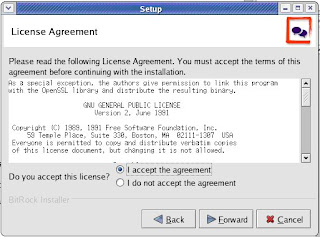
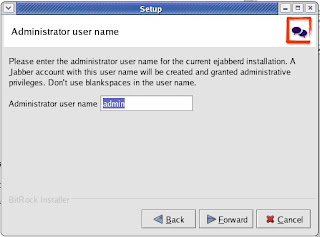
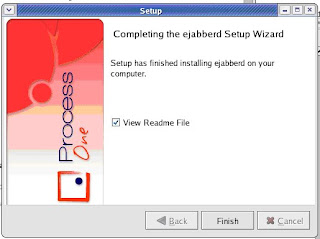
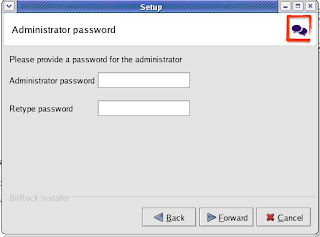
You will get following screens
Improving the speed
%% For all users except admins used "normal" shaper
{access, c2s_shaper, [{none, admin},
{normal, all}]}.
Change "normal" to "fast":
%% For all users except admins used "fast" shaper
{access, c2s_shaper, [{none, admin},
{fast, all}]}.
ConnectionConfiguration config = new ConnectionConfiguration("localhost",5222);
XMPPConnection connection = new XMPPConnection(config);
connection.connect();
connection.login("demo", "password");
for(int i=0 ; i < 10; i ++)
{
Message message = new Message();
message.setTo("admin@localhost");
message.setBody("Test message from demo " + i);
message.setType(Message.Type.chat);
connection.sendPacket(message);
}
JABBER Installation
Download location
http://www.ejabberd.im/ejabberd-2.0.1
Or
http://www.process-one.net/en/ejabberd/downloads
Step1:
Download Linux x86 32-bits Installer from the download page
Step2:
ejabberd-2.0.1_2-linux-x86-installer.bin.gz
untar the gunzip using following command
tar –d ejabberd-2.0.1_2-linux-x86-installer.bin.gz
You will get
ejabberd-2.0.1_2-linux-x86-installer.bin
execute the bin file using following command (chmod 777 ejabberd-2.0.1_2-linux-x86-installer.bin)
./ejabberd-2.0.1_2-linux-x86-installer.bin
You will get following screens


Improving the speed
%% For all users except admins used "normal" shaper
{access, c2s_shaper, [{none, admin},
{normal, all}]}.
Change "normal" to "fast":
%% For all users except admins used "fast" shaper
{access, c2s_shaper, [{none, admin},
{fast, all}]}.
J2ME RMS
package rms;
import javax.microedition.midlet.*;
import javax.microedition.rms.RecordEnumeration;
import javax.microedition.rms.RecordStore;
import javax.microedition.rms.RecordStoreException;
import javax.microedition.lcdui.*;
import javax.swing.JLabel;
import java.awt.Font;
import java.io.*;
public class ReadWriteRecord
extends MIDlet implements CommandListener {
private Display display;
private Alert alert;
private Form form;
private Command exit;
private Command read,readByte;
private Command write,writeByte;
private Command delete;
private RecordStore recordstoreRead,recordstoreWrite,recordstoreDelete = null;
RecordEnumeration recEnum;
public ReadWriteRecord() {
display = Display.getDisplay(this);
exit = new Command("Exit", Command.EXIT, 1);
read = new Command("Read", Command.SCREEN, 1);
readByte = new Command("Read Byte", Command.SCREEN, 1);
write = new Command("Write", Command.SCREEN, 1);
writeByte = new Command("Write Byte", Command.SCREEN, 1);
delete = new Command("Delete",Command.SCREEN,2);
//////////////////////////
//Font font = new Font("TAU_Elango_Ragham",22,22);
///////////////////////////
form = new Form("Mixed Record " + "\"வாழ்க வளமுடன்\"");
form.addCommand(exit);
form.addCommand(read);
form.addCommand(write);
form.addCommand(readByte);
form.addCommand(writeByte);
form.addCommand(delete);
form.setCommandListener(this);
}
public void startApp()
{
display.setCurrent(form);
}
public void pauseApp()
{
}
public void destroyApp( boolean unconditional )
{
}
public void commandAction(Command command, Displayable displayable)
{
if (command == exit)
{
destroyApp(true);
notifyDestroyed();
}
else if (command == read)
{
doRead();
}
else if (command == write)
{
doWrite();
}
else if (command == readByte)
{
doReadByte();
}
else if (command == writeByte)
{
doWriteByte();
}
else if (command == delete)
{
doDelete();
}
}
public void doRead()
{
try
{
recordstoreRead = RecordStore.openRecordStore("myRecordStoreUTF", true );
System.out.println("NumRecords : " + recordstoreRead.getNumRecords());
for (int i = 1; i <= recordstoreRead.getNumRecords(); i++)
{
byte[] byteInputData = new byte[50];
recordstoreRead.getRecord(i, byteInputData, 0);
ByteArrayInputStream inputStream = new ByteArrayInputStream(byteInputData);
DataInputStream inputDataStream = new DataInputStream(inputStream);
StringItem idItem = new StringItem("Id: ", String.valueOf(inputDataStream.readInt()));
StringItem nameItem = new StringItem("Name :", inputDataStream.readUTF());
StringItem ageItem = new StringItem("Age :", inputDataStream.readUTF());
StringItem sexItem = new StringItem("Sex :", inputDataStream.readUTF());
form.append(idItem);
form.append(nameItem);
form.append(ageItem);
form.append(sexItem);
}
Alert a = new Alert("Success", "Read Records finished", null, AlertType.INFO);
Display.getDisplay(this).setCurrent(a);
}
catch(Exception ex)
{
Alert a = new Alert("Fail to read", ex.getMessage(), null, AlertType.ERROR);
Display.getDisplay(this).setCurrent(a);
System.out.println("Unable to read the Record");
ex.printStackTrace();
}
}
public void doWrite()
{
ByteArrayOutputStream bout = new ByteArrayOutputStream();
DataOutputStream dout = new DataOutputStream( bout );
try
{
recordstoreWrite = RecordStore.openRecordStore("myRecordStoreUTF", true );
int input_id = 1;
String input_name = "Senthil";
String input_age = "29";
String input_sex = "Male";
byte dataArray[];
try
{
dout.writeInt( input_id );
dout.writeUTF( input_name );
dout.writeUTF( input_age );
dout.writeUTF( input_sex);
dout.close();
dataArray = bout.toByteArray();
recordstoreWrite.addRecord( dataArray, 0, dataArray.length );
}
catch( RecordStoreException e )
{
// handle RMS error here
}
catch( IOException e )
{
// handle IO error here
}
recordstoreWrite.closeRecordStore();
Alert a = new Alert("Success to Write", "Record written into File", null, AlertType.INFO);
Display.getDisplay(this).setCurrent(a);
}
catch(Exception ex)
{
Alert a = new Alert("Fail to write", ex.getMessage(), null, AlertType.ERROR);
Display.getDisplay(this).setCurrent(a);
System.out.println("Unable to write the Record");
ex.printStackTrace();
}
}
}
import javax.microedition.midlet.*;
import javax.microedition.rms.RecordEnumeration;
import javax.microedition.rms.RecordStore;
import javax.microedition.rms.RecordStoreException;
import javax.microedition.lcdui.*;
import javax.swing.JLabel;
import java.awt.Font;
import java.io.*;
public class ReadWriteRecord
extends MIDlet implements CommandListener {
private Display display;
private Alert alert;
private Form form;
private Command exit;
private Command read,readByte;
private Command write,writeByte;
private Command delete;
private RecordStore recordstoreRead,recordstoreWrite,recordstoreDelete = null;
RecordEnumeration recEnum;
public ReadWriteRecord() {
display = Display.getDisplay(this);
exit = new Command("Exit", Command.EXIT, 1);
read = new Command("Read", Command.SCREEN, 1);
readByte = new Command("Read Byte", Command.SCREEN, 1);
write = new Command("Write", Command.SCREEN, 1);
writeByte = new Command("Write Byte", Command.SCREEN, 1);
delete = new Command("Delete",Command.SCREEN,2);
//////////////////////////
//Font font = new Font("TAU_Elango_Ragham",22,22);
///////////////////////////
form = new Form("Mixed Record " + "\"வாழ்க வளமுடன்\"");
form.addCommand(exit);
form.addCommand(read);
form.addCommand(write);
form.addCommand(readByte);
form.addCommand(writeByte);
form.addCommand(delete);
form.setCommandListener(this);
}
public void startApp()
{
display.setCurrent(form);
}
public void pauseApp()
{
}
public void destroyApp( boolean unconditional )
{
}
public void commandAction(Command command, Displayable displayable)
{
if (command == exit)
{
destroyApp(true);
notifyDestroyed();
}
else if (command == read)
{
doRead();
}
else if (command == write)
{
doWrite();
}
else if (command == readByte)
{
doReadByte();
}
else if (command == writeByte)
{
doWriteByte();
}
else if (command == delete)
{
doDelete();
}
}
public void doRead()
{
try
{
recordstoreRead = RecordStore.openRecordStore("myRecordStoreUTF", true );
System.out.println("NumRecords : " + recordstoreRead.getNumRecords());
for (int i = 1; i <= recordstoreRead.getNumRecords(); i++)
{
byte[] byteInputData = new byte[50];
recordstoreRead.getRecord(i, byteInputData, 0);
ByteArrayInputStream inputStream = new ByteArrayInputStream(byteInputData);
DataInputStream inputDataStream = new DataInputStream(inputStream);
StringItem idItem = new StringItem("Id: ", String.valueOf(inputDataStream.readInt()));
StringItem nameItem = new StringItem("Name :", inputDataStream.readUTF());
StringItem ageItem = new StringItem("Age :", inputDataStream.readUTF());
StringItem sexItem = new StringItem("Sex :", inputDataStream.readUTF());
form.append(idItem);
form.append(nameItem);
form.append(ageItem);
form.append(sexItem);
}
Alert a = new Alert("Success", "Read Records finished", null, AlertType.INFO);
Display.getDisplay(this).setCurrent(a);
}
catch(Exception ex)
{
Alert a = new Alert("Fail to read", ex.getMessage(), null, AlertType.ERROR);
Display.getDisplay(this).setCurrent(a);
System.out.println("Unable to read the Record");
ex.printStackTrace();
}
}
public void doWrite()
{
ByteArrayOutputStream bout = new ByteArrayOutputStream();
DataOutputStream dout = new DataOutputStream( bout );
try
{
recordstoreWrite = RecordStore.openRecordStore("myRecordStoreUTF", true );
int input_id = 1;
String input_name = "Senthil";
String input_age = "29";
String input_sex = "Male";
byte dataArray[];
try
{
dout.writeInt( input_id );
dout.writeUTF( input_name );
dout.writeUTF( input_age );
dout.writeUTF( input_sex);
dout.close();
dataArray = bout.toByteArray();
recordstoreWrite.addRecord( dataArray, 0, dataArray.length );
}
catch( RecordStoreException e )
{
// handle RMS error here
}
catch( IOException e )
{
// handle IO error here
}
recordstoreWrite.closeRecordStore();
Alert a = new Alert("Success to Write", "Record written into File", null, AlertType.INFO);
Display.getDisplay(this).setCurrent(a);
}
catch(Exception ex)
{
Alert a = new Alert("Fail to write", ex.getMessage(), null, AlertType.ERROR);
Display.getDisplay(this).setCurrent(a);
System.out.println("Unable to write the Record");
ex.printStackTrace();
}
}
}
Subscribe to:
Posts (Atom)
