புத்தாண்டு வாழ்த்துக்கள்
புதியதை பூத்த புத்தாண்டு வருக !
புதிய இன்பம் தருக , துன்பம் எடு
சுறுசுப்பை கொடு , சோம்பலை எடு
வெற்றியை கொடு , தோல்வியை எடு
விலைவாசி எங்களை விழுங்காமல் பார்துக்கொள்
லஞ்சம் எங்களை நெருங்காமல் பார்துக்கொள்
நோய்களை நோயுர செய், சாவுக்கு சாவு கொடு
ஆரோக்கிய வாழ்க்கையை அன்பாக்கு
மனைவியுடன் நேசதையும் மழலையுடன் பாசத்தையும் தா
நண்பர்களுடன் நெருக்கமும் எதிரிக்கு சருக்கம் கொடு
Wednesday, February 8, 2012


Thursday, January 6, 2011
புத்தாண்டு வாழ்த்துக்கள்
புத்தாண்டு வாழ்த்துக்கள்
புதியதை பூத்த புத்தாண்டு வருக !
புதிய இன்பம் தருக , துன்பம் எடு
சுறுசுப்பை கொடு , சோம்பலை எடு
வெற்றியை கொடு , தோல்வியை எடு
விலைவாசி எங்களை விழுங்காமல் பார்துக்கொள்
லஞ்சம் எங்களை நெருங்காமல் பார்துக்கொள்
நோய்களை நோயுர செய், சாவுக்கு சாவு கொடு
ஆரோக்கிய வாழ்க்கையை அன்பாக்கு
மனைவியுடன் நேசதையும் மழலையுடன் பாசத்தையும் தா
நண்பர்களுடன் நெருக்கமும் எதிரிக்கு சருக்கம் கொடு
புதியதை பூத்த புத்தாண்டு வருக !
புதிய இன்பம் தருக , துன்பம் எடு
சுறுசுப்பை கொடு , சோம்பலை எடு
வெற்றியை கொடு , தோல்வியை எடு
விலைவாசி எங்களை விழுங்காமல் பார்துக்கொள்
லஞ்சம் எங்களை நெருங்காமல் பார்துக்கொள்
நோய்களை நோயுர செய், சாவுக்கு சாவு கொடு
ஆரோக்கிய வாழ்க்கையை அன்பாக்கு
மனைவியுடன் நேசதையும் மழலையுடன் பாசத்தையும் தா
நண்பர்களுடன் நெருக்கமும் எதிரிக்கு சருக்கம் கொடு
Saturday, August 28, 2010
WebService3.0
package com.ws;
TestWS.java
import javax.jws.WebMethod;
import javax.jws.WebParam;
import javax.jws.WebService;
import javax.jws.soap.SOAPBinding;
@WebService(name = "TestWS")
@SOAPBinding(
style = SOAPBinding.Style.DOCUMENT,
use = SOAPBinding.Use.LITERAL,
parameterStyle = SOAPBinding.ParameterStyle.WRAPPED)
public class TestWS {
/**
* This method will accept a string and prefix with Hello.
*
* @param name
* @return
*/
@WebMethod
public String greet(@WebParam(name="name") String name )
{
return "Hello" + name;
}
}
web.xml
TestWS.java
import javax.jws.WebMethod;
import javax.jws.WebParam;
import javax.jws.WebService;
import javax.jws.soap.SOAPBinding;
@WebService(name = "TestWS")
@SOAPBinding(
style = SOAPBinding.Style.DOCUMENT,
use = SOAPBinding.Use.LITERAL,
parameterStyle = SOAPBinding.ParameterStyle.WRAPPED)
public class TestWS {
/**
* This method will accept a string and prefix with Hello.
*
* @param name
* @return
*/
@WebMethod
public String greet(@WebParam(name="name") String name )
{
return "Hello" + name;
}
}
web.xml
HelloWorldWeb
TestWS
com.ws.TestWS
1
TestWS
/TestWS
30
EJB_30
Hello.java
package src;
import javax.ejb.Remote;
@Remote
public interface Hello {
public String sayHello(String name);
}
HelloLocal
package src;
import javax.ejb.Remote;
@Remote
public interface Hello {
public String sayHello(String name);
}
HelloBean.java
package src;
import java.util.Properties;
import javax.annotation.PostConstruct;
import javax.ejb.EJB;
import javax.ejb.Stateless;
import javax.naming.Context;
import javax.naming.InitialContext;
import javax.naming.NamingException;
import org.jboss.aop.microcontainer.aspects.jndi.JndiBinding;
import src.count.Count;
/**
* Session Bean implementation class HelloBean
*/
@Stateless(name="HelloBean")
@JndiBinding(name="HelloBean")
public class HelloBean implements Hello, HelloLocal {
@EJB(name="CountBean") Count count;
//Count count = null;
/**
* Default constructor.
*/
public HelloBean() {
// TODO Auto-generated constructor stub
}
@PostConstruct
public void init()
{
}
public String sayHello(String name)
{
//count = lookupCountBean();
count.addVisitor(name);
count.saveVisitor();
return "Hello, " + name;
}
private Count lookupCountBean() {
try {
Properties properties = new Properties();
properties.put("java.naming.factory.initial",
"org.jnp.interfaces.NamingContextFactory");
properties.put("java.naming.factory.url.pkgs",
"org.jboss.naming rg.jnp.interfaces");
properties.put("java.naming.provider.url", "jnp://localhost:1091");
Context ctx = new InitialContext(properties);
System.out.println("Got context");
return (Count) ctx.lookup("CountBean/remote");
}
catch(NamingException ne) {
throw new RuntimeException(ne);
}
}
}
Count.java
package src.count;
import java.util.ArrayList;
import javax.ejb.Remote;
@Remote
public interface Count {
public void saveVisitor();
public void addVisitor(String user);
public int totalVisitor();
public int onlineVisitor();
public ArrayList getVisitors();
}
CountLocal.java
Same as above Count.java
Contents
CountBean.java
package src.count;
import java.io.BufferedWriter;
import java.io.File;
import java.io.FileWriter;
import java.io.IOException;
import java.util.ArrayList;
import java.util.Vector;
import javax.annotation.PostConstruct;
import javax.annotation.PreDestroy;
import javax.ejb.Stateful;
import org.jboss.aop.microcontainer.aspects.jndi.JndiBinding;
/**
* Session Bean implementation class CountBean
*/
@Stateful(name="CountBean")
@JndiBinding(name="CountBean")
public class CountBean implements Count, CountLocal {
/**
* Default constructor.
*/
Vector visitors = new Vector();
int onlineUsers = 0;
int totalUsers = 0;
public CountBean() {
}
@PostConstruct
public void init(String name) {
// TODO Auto-generated constructor stub
visitors.add(name);
onlineUsers ++;
totalUsers ++;
}
public CountBean(String name) {
// TODO Auto-generated constructor stub
visitors.add(name);
onlineUsers ++;
totalUsers ++;
}
@PreDestroy
public void remove() {
onlineUsers --;
FileWriter file = null;
BufferedWriter bFile = null;
try
{
file = new FileWriter(new File("c:\\users.txt"));
bFile = new BufferedWriter(file);
for( String strName : visitors)
{
bFile.write(strName+"\n");
}
}
catch(Exception ex)
{
}
finally
{
try {
if (bFile!= null) bFile.close();
if (file != null) file.close();
} catch (IOException e) {
// TODO Auto-generated catch block
e.printStackTrace();
}
}
}
public int totalVisitor() {return onlineUsers; }
public int onlineVisitor() { return totalUsers; }
public ArrayList getVisitors(){ return null; }
public void addVisitor(String user) {
visitors.add(user);
}
public void saveVisitor() {
FileWriter file = null;
BufferedWriter bFile = null;
try
{
file = new FileWriter(new File("c:\\users.txt"));
bFile = new BufferedWriter(file);
for( String strName : visitors)
{
bFile.write(strName+"\n");
System.out.println("Name = " + strName);
}
}
catch(Exception ex)
{
}
finally
{
try {
if (bFile!= null) bFile.close();
if (file != null) file.close();
} catch (IOException e) {
// TODO Auto-generated catch block
e.printStackTrace();
}
}
}
}
index.jsp
InitialContext ctx = new InitialContext();
try
{
Hello hello = (Hello) ctx.lookup("HelloBean/remote");
String name = "";
if (request.getParameter("tname") == null)
{
name = (String) session.getValue("name");
}
else
name = request.getParameter("tname");
out.println( hello.sayHello( name ));
}
catch(Exception ex)
{
ex.printStackTrace();
}
package src;
import javax.ejb.Remote;
@Remote
public interface Hello {
public String sayHello(String name);
}
HelloLocal
package src;
import javax.ejb.Remote;
@Remote
public interface Hello {
public String sayHello(String name);
}
HelloBean.java
package src;
import java.util.Properties;
import javax.annotation.PostConstruct;
import javax.ejb.EJB;
import javax.ejb.Stateless;
import javax.naming.Context;
import javax.naming.InitialContext;
import javax.naming.NamingException;
import org.jboss.aop.microcontainer.aspects.jndi.JndiBinding;
import src.count.Count;
/**
* Session Bean implementation class HelloBean
*/
@Stateless(name="HelloBean")
@JndiBinding(name="HelloBean")
public class HelloBean implements Hello, HelloLocal {
@EJB(name="CountBean") Count count;
//Count count = null;
/**
* Default constructor.
*/
public HelloBean() {
// TODO Auto-generated constructor stub
}
@PostConstruct
public void init()
{
}
public String sayHello(String name)
{
//count = lookupCountBean();
count.addVisitor(name);
count.saveVisitor();
return "Hello, " + name;
}
private Count lookupCountBean() {
try {
Properties properties = new Properties();
properties.put("java.naming.factory.initial",
"org.jnp.interfaces.NamingContextFactory");
properties.put("java.naming.factory.url.pkgs",
"org.jboss.naming rg.jnp.interfaces");
properties.put("java.naming.provider.url", "jnp://localhost:1091");
Context ctx = new InitialContext(properties);
System.out.println("Got context");
return (Count) ctx.lookup("CountBean/remote");
}
catch(NamingException ne) {
throw new RuntimeException(ne);
}
}
}
Count.java
package src.count;
import java.util.ArrayList;
import javax.ejb.Remote;
@Remote
public interface Count {
public void saveVisitor();
public void addVisitor(String user);
public int totalVisitor();
public int onlineVisitor();
public ArrayList
}
CountLocal.java
Same as above Count.java
Contents
CountBean.java
package src.count;
import java.io.BufferedWriter;
import java.io.File;
import java.io.FileWriter;
import java.io.IOException;
import java.util.ArrayList;
import java.util.Vector;
import javax.annotation.PostConstruct;
import javax.annotation.PreDestroy;
import javax.ejb.Stateful;
import org.jboss.aop.microcontainer.aspects.jndi.JndiBinding;
/**
* Session Bean implementation class CountBean
*/
@Stateful(name="CountBean")
@JndiBinding(name="CountBean")
public class CountBean implements Count, CountLocal {
/**
* Default constructor.
*/
Vector
int onlineUsers = 0;
int totalUsers = 0;
public CountBean() {
}
@PostConstruct
public void init(String name) {
// TODO Auto-generated constructor stub
visitors.add(name);
onlineUsers ++;
totalUsers ++;
}
public CountBean(String name) {
// TODO Auto-generated constructor stub
visitors.add(name);
onlineUsers ++;
totalUsers ++;
}
@PreDestroy
public void remove() {
onlineUsers --;
FileWriter file = null;
BufferedWriter bFile = null;
try
{
file = new FileWriter(new File("c:\\users.txt"));
bFile = new BufferedWriter(file);
for( String strName : visitors)
{
bFile.write(strName+"\n");
}
}
catch(Exception ex)
{
}
finally
{
try {
if (bFile!= null) bFile.close();
if (file != null) file.close();
} catch (IOException e) {
// TODO Auto-generated catch block
e.printStackTrace();
}
}
}
public int totalVisitor() {return onlineUsers; }
public int onlineVisitor() { return totalUsers; }
public ArrayList
public void addVisitor(String user) {
visitors.add(user);
}
public void saveVisitor() {
FileWriter file = null;
BufferedWriter bFile = null;
try
{
file = new FileWriter(new File("c:\\users.txt"));
bFile = new BufferedWriter(file);
for( String strName : visitors)
{
bFile.write(strName+"\n");
System.out.println("Name = " + strName);
}
}
catch(Exception ex)
{
}
finally
{
try {
if (bFile!= null) bFile.close();
if (file != null) file.close();
} catch (IOException e) {
// TODO Auto-generated catch block
e.printStackTrace();
}
}
}
}
index.jsp
InitialContext ctx = new InitialContext();
try
{
Hello hello = (Hello) ctx.lookup("HelloBean/remote");
String name = "";
if (request.getParameter("tname") == null)
{
name = (String) session.getValue("name");
}
else
name = request.getParameter("tname");
out.println( hello.sayHello( name ));
}
catch(Exception ex)
{
ex.printStackTrace();
}
Tuesday, August 24, 2010
Profiling_Java_WLST
Profiling using JRockit Flight Recorder (Please switch on Flight Recorder using XX:+FlightRecorder)
CreateDataSource.sh
$JDK_BIN/java weblogic.WLST $SERVICE_JYTHON_DIR/createDataSourceFactory.py $1 $2 $3
DAYSTAMP=`(set \`date\`; echo $3)`_`(set \`date\`; echo $2)`_`(set \`date\`; echo $6)`_`(set \`date\`; echo $4)`
export PID=`ps -wwef | grep java | grep WLST | awk '{print $2 }'`
$JDK_BIN/jrcmd $PID start_flightrecording filename=/tmp/${WLS_RELEASE}_${WLS_BUILD}_CreateDataSourceFactory_${DAYSTAMP}.jfr &
sleep 10
createDataSourceFactory.py
import os
import jarray
URL=os.environ['ADMIN_URL']
dataSourceFactoryName=sys.argv[1]
username=sys.argv[2]
password=sys.argv[3]
dbhost=os.environ['DB_HOSTNAME']
dbport=os.environ['DB_PORT']
dbsid=os.environ['DB_SID']
#=====================================================================#
# connect to the AdminServer #
#=====================================================================#
connect( os.environ['WLS_USER'], os.environ['WLS_PW'], URL)
edit()
startEdit()
cd("/")
import time
startTime=time.time()
cmo.createJDBCDataSourceFactory(dataSourceFactoryName)
cd('/JDBCDataSourceFactories/'+dataSourceFactoryName)
set("UserName", username)
set("Password",password)
set("FactoryName", "MyFactory")
set("DriverClassName", "weblogic.jdbcx.oracle.OracleDataSource")
set("URL", "jdbc:oracle:thin:@"+dbhost+":"+dbport+":"+dbsid)
activate()
import time
endTime=time.time()
print "CreateDataSourceFactory: %.3f" % (endTime-startTime)
exit()
CreateDataSource.sh
$JDK_BIN/java weblogic.WLST $SERVICE_JYTHON_DIR/createDataSourceFactory.py $1 $2 $3
DAYSTAMP=`(set \`date\`; echo $3)`_`(set \`date\`; echo $2)`_`(set \`date\`; echo $6)`_`(set \`date\`; echo $4)`
export PID=`ps -wwef | grep java | grep WLST | awk '{print $2 }'`
$JDK_BIN/jrcmd $PID start_flightrecording filename=/tmp/${WLS_RELEASE}_${WLS_BUILD}_CreateDataSourceFactory_${DAYSTAMP}.jfr &
sleep 10
createDataSourceFactory.py
import os
import jarray
URL=os.environ['ADMIN_URL']
dataSourceFactoryName=sys.argv[1]
username=sys.argv[2]
password=sys.argv[3]
dbhost=os.environ['DB_HOSTNAME']
dbport=os.environ['DB_PORT']
dbsid=os.environ['DB_SID']
#=====================================================================#
# connect to the AdminServer #
#=====================================================================#
connect( os.environ['WLS_USER'], os.environ['WLS_PW'], URL)
edit()
startEdit()
cd("/")
import time
startTime=time.time()
cmo.createJDBCDataSourceFactory(dataSourceFactoryName)
cd('/JDBCDataSourceFactories/'+dataSourceFactoryName)
set("UserName", username)
set("Password",password)
set("FactoryName", "MyFactory")
set("DriverClassName", "weblogic.jdbcx.oracle.OracleDataSource")
set("URL", "jdbc:oracle:thin:@"+dbhost+":"+dbport+":"+dbsid)
activate()
import time
endTime=time.time()
print "CreateDataSourceFactory: %.3f" % (endTime-startTime)
exit()
Thursday, June 10, 2010
NFS Sharing
NFS Settings
1. Create a Folder in Target Server /JMSFileStore on remotehost
2. Provide the permission like chmod 777 /JMSFileStore
3. Login to Node1 -> execute the following commands
4. Login as root
5. mkdir /JMSFileStore on Node1
6. mount -t nfs remotehost:/private/JMSStore /JMSStore -o rw,rsize=16384,wsize=16384,hard,tcp,nolock,addr=10.xxx.xxx.52
7. Now the folder is shared on Node1
1. Create a Folder in Target Server /JMSFileStore on remotehost
2. Provide the permission like chmod 777 /JMSFileStore
3. Login to Node1 -> execute the following commands
4. Login as root
5. mkdir /JMSFileStore on Node1
6. mount -t nfs remotehost:/private/JMSStore /JMSStore -o rw,rsize=16384,wsize=16384,hard,tcp,nolock,addr=10.xxx.xxx.52
7. Now the folder is shared on Node1
Profile
Using JProfile6
export LD_LIBRARY_PATH=/jprofiler6/bin/linux-x86
Append this line -agentlib:jprofilerti=port=8849 -Xbootclasspath/a:/jprofiler6/bin/agent.jar
Taking Thread Dump
connect('weblogic','weblogic1','t3://localhost.com:8001')
threadDump(writeToFile='true', fileName='/tmp/thread_dump.log', serverName='soa_server1')
exit()
export LD_LIBRARY_PATH=/jprofiler6/bin/linux-x86
Append this line -agentlib:jprofilerti=port=8849 -Xbootclasspath/a:/jprofiler6/bin/agent.jar
Taking Thread Dump
connect('weblogic','weblogic1','t3://localhost.com:8001')
threadDump(writeToFile='true', fileName='/tmp/thread_dump.log', serverName='soa_server1')
exit()
Thursday, December 10, 2009
Connect2Computer
Do u want 2 be sharing files&document btw d 2 pc without internet or u want d 2 pc to be on internet? if its sharing ur documents,file&printer without internet btw d 2pc then u must get a cross-cable. But if u want d 2 pc on internet then u hv to configure router so tht it serve as ur gateway, by setting ip given by ur ISP as ur default gateway&create and ip for d 2 pc. for example
COMPUTER 1
IP 192.168.1.2
SUBNET-MASK 255.255.255.0
DEFAULT GATEWAY 192.168.1.1
COMPUTER 2
IP 192.168.1.1
SUBNET-MASK 255.255.255.0
DEFAULT GATEWAY 192.168.1.1
I hope its clear enough
COMPUTER 1
IP 192.168.1.2
SUBNET-MASK 255.255.255.0
DEFAULT GATEWAY 192.168.1.1
COMPUTER 2
IP 192.168.1.1
SUBNET-MASK 255.255.255.0
DEFAULT GATEWAY 192.168.1.1
I hope its clear enough
JavaTime
java.util.Date d2=new java.util.Date(System.currentTimeMillis());
simpleDateFormat=new java.text.SimpleDateFormat("dd MMM yyyy HH:mm:ss z");
date = simpleDateFormat.format(d2);
System.out.println("date2>>>>>>>>"+date);
Timestamp t = new Timestamp( simpleDateFormat.parse(d2.toGMTString()).getTime() );
System.out.println("TS = " + t);
http://java.sun.com/j2se/1.4.2/docs/api/java/text/SimpleDateFormat.html
http://www.java2s.com/Code/Java/Database-SQL-JDBC/Timestampparse.htm
simpleDateFormat=new java.text.SimpleDateFormat("dd MMM yyyy HH:mm:ss z");
date = simpleDateFormat.format(d2);
System.out.println("date2>>>>>>>>"+date);
Timestamp t = new Timestamp( simpleDateFormat.parse(d2.toGMTString()).getTime() );
System.out.println("TS = " + t);
http://java.sun.com/j2se/1.4.2/docs/api/java/text/SimpleDateFormat.html
http://www.java2s.com/Code/Java/Database-SQL-JDBC/Timestampparse.htm
Wednesday, August 6, 2008
Jabber Instance Messaging
Java Code to send Jabber Instance Message
ConnectionConfiguration config = new ConnectionConfiguration("localhost",5222);
XMPPConnection connection = new XMPPConnection(config);
connection.connect();
connection.login("demo", "password");
for(int i=0 ; i < 10; i ++)
{
Message message = new Message();
message.setTo("admin@localhost");
message.setBody("Test message from demo " + i);
message.setType(Message.Type.chat);
connection.sendPacket(message);
}
JABBER Installation
Download location
http://www.ejabberd.im/ejabberd-2.0.1
Or
http://www.process-one.net/en/ejabberd/downloads
Step1:
Download Linux x86 32-bits Installer from the download page
Step2:
ejabberd-2.0.1_2-linux-x86-installer.bin.gz
untar the gunzip using following command
tar –d ejabberd-2.0.1_2-linux-x86-installer.bin.gz
You will get
ejabberd-2.0.1_2-linux-x86-installer.bin
execute the bin file using following command (chmod 777 ejabberd-2.0.1_2-linux-x86-installer.bin)
./ejabberd-2.0.1_2-linux-x86-installer.bin
You will get following screens
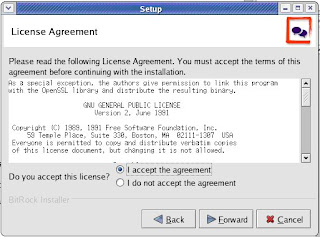
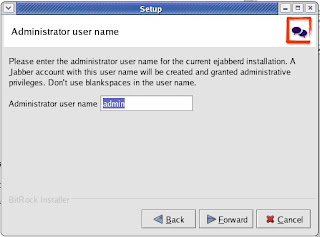
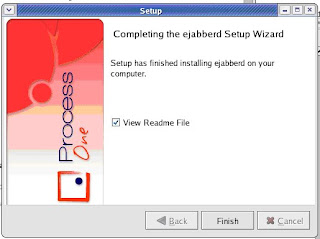
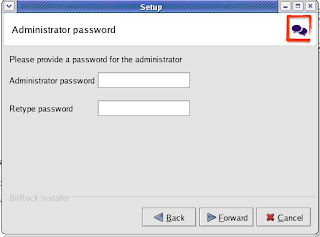
Improving the speed
%% For all users except admins used "normal" shaper
{access, c2s_shaper, [{none, admin},
{normal, all}]}.
Change "normal" to "fast":
%% For all users except admins used "fast" shaper
{access, c2s_shaper, [{none, admin},
{fast, all}]}.
ConnectionConfiguration config = new ConnectionConfiguration("localhost",5222);
XMPPConnection connection = new XMPPConnection(config);
connection.connect();
connection.login("demo", "password");
for(int i=0 ; i < 10; i ++)
{
Message message = new Message();
message.setTo("admin@localhost");
message.setBody("Test message from demo " + i);
message.setType(Message.Type.chat);
connection.sendPacket(message);
}
JABBER Installation
Download location
http://www.ejabberd.im/ejabberd-2.0.1
Or
http://www.process-one.net/en/ejabberd/downloads
Step1:
Download Linux x86 32-bits Installer from the download page
Step2:
ejabberd-2.0.1_2-linux-x86-installer.bin.gz
untar the gunzip using following command
tar –d ejabberd-2.0.1_2-linux-x86-installer.bin.gz
You will get
ejabberd-2.0.1_2-linux-x86-installer.bin
execute the bin file using following command (chmod 777 ejabberd-2.0.1_2-linux-x86-installer.bin)
./ejabberd-2.0.1_2-linux-x86-installer.bin
You will get following screens


Improving the speed
%% For all users except admins used "normal" shaper
{access, c2s_shaper, [{none, admin},
{normal, all}]}.
Change "normal" to "fast":
%% For all users except admins used "fast" shaper
{access, c2s_shaper, [{none, admin},
{fast, all}]}.
J2ME RMS
package rms;
import javax.microedition.midlet.*;
import javax.microedition.rms.RecordEnumeration;
import javax.microedition.rms.RecordStore;
import javax.microedition.rms.RecordStoreException;
import javax.microedition.lcdui.*;
import javax.swing.JLabel;
import java.awt.Font;
import java.io.*;
public class ReadWriteRecord
extends MIDlet implements CommandListener {
private Display display;
private Alert alert;
private Form form;
private Command exit;
private Command read,readByte;
private Command write,writeByte;
private Command delete;
private RecordStore recordstoreRead,recordstoreWrite,recordstoreDelete = null;
RecordEnumeration recEnum;
public ReadWriteRecord() {
display = Display.getDisplay(this);
exit = new Command("Exit", Command.EXIT, 1);
read = new Command("Read", Command.SCREEN, 1);
readByte = new Command("Read Byte", Command.SCREEN, 1);
write = new Command("Write", Command.SCREEN, 1);
writeByte = new Command("Write Byte", Command.SCREEN, 1);
delete = new Command("Delete",Command.SCREEN,2);
//////////////////////////
//Font font = new Font("TAU_Elango_Ragham",22,22);
///////////////////////////
form = new Form("Mixed Record " + "\"வாழ்க வளமுடன்\"");
form.addCommand(exit);
form.addCommand(read);
form.addCommand(write);
form.addCommand(readByte);
form.addCommand(writeByte);
form.addCommand(delete);
form.setCommandListener(this);
}
public void startApp()
{
display.setCurrent(form);
}
public void pauseApp()
{
}
public void destroyApp( boolean unconditional )
{
}
public void commandAction(Command command, Displayable displayable)
{
if (command == exit)
{
destroyApp(true);
notifyDestroyed();
}
else if (command == read)
{
doRead();
}
else if (command == write)
{
doWrite();
}
else if (command == readByte)
{
doReadByte();
}
else if (command == writeByte)
{
doWriteByte();
}
else if (command == delete)
{
doDelete();
}
}
public void doRead()
{
try
{
recordstoreRead = RecordStore.openRecordStore("myRecordStoreUTF", true );
System.out.println("NumRecords : " + recordstoreRead.getNumRecords());
for (int i = 1; i <= recordstoreRead.getNumRecords(); i++)
{
byte[] byteInputData = new byte[50];
recordstoreRead.getRecord(i, byteInputData, 0);
ByteArrayInputStream inputStream = new ByteArrayInputStream(byteInputData);
DataInputStream inputDataStream = new DataInputStream(inputStream);
StringItem idItem = new StringItem("Id: ", String.valueOf(inputDataStream.readInt()));
StringItem nameItem = new StringItem("Name :", inputDataStream.readUTF());
StringItem ageItem = new StringItem("Age :", inputDataStream.readUTF());
StringItem sexItem = new StringItem("Sex :", inputDataStream.readUTF());
form.append(idItem);
form.append(nameItem);
form.append(ageItem);
form.append(sexItem);
}
Alert a = new Alert("Success", "Read Records finished", null, AlertType.INFO);
Display.getDisplay(this).setCurrent(a);
}
catch(Exception ex)
{
Alert a = new Alert("Fail to read", ex.getMessage(), null, AlertType.ERROR);
Display.getDisplay(this).setCurrent(a);
System.out.println("Unable to read the Record");
ex.printStackTrace();
}
}
public void doWrite()
{
ByteArrayOutputStream bout = new ByteArrayOutputStream();
DataOutputStream dout = new DataOutputStream( bout );
try
{
recordstoreWrite = RecordStore.openRecordStore("myRecordStoreUTF", true );
int input_id = 1;
String input_name = "Senthil";
String input_age = "29";
String input_sex = "Male";
byte dataArray[];
try
{
dout.writeInt( input_id );
dout.writeUTF( input_name );
dout.writeUTF( input_age );
dout.writeUTF( input_sex);
dout.close();
dataArray = bout.toByteArray();
recordstoreWrite.addRecord( dataArray, 0, dataArray.length );
}
catch( RecordStoreException e )
{
// handle RMS error here
}
catch( IOException e )
{
// handle IO error here
}
recordstoreWrite.closeRecordStore();
Alert a = new Alert("Success to Write", "Record written into File", null, AlertType.INFO);
Display.getDisplay(this).setCurrent(a);
}
catch(Exception ex)
{
Alert a = new Alert("Fail to write", ex.getMessage(), null, AlertType.ERROR);
Display.getDisplay(this).setCurrent(a);
System.out.println("Unable to write the Record");
ex.printStackTrace();
}
}
}
import javax.microedition.midlet.*;
import javax.microedition.rms.RecordEnumeration;
import javax.microedition.rms.RecordStore;
import javax.microedition.rms.RecordStoreException;
import javax.microedition.lcdui.*;
import javax.swing.JLabel;
import java.awt.Font;
import java.io.*;
public class ReadWriteRecord
extends MIDlet implements CommandListener {
private Display display;
private Alert alert;
private Form form;
private Command exit;
private Command read,readByte;
private Command write,writeByte;
private Command delete;
private RecordStore recordstoreRead,recordstoreWrite,recordstoreDelete = null;
RecordEnumeration recEnum;
public ReadWriteRecord() {
display = Display.getDisplay(this);
exit = new Command("Exit", Command.EXIT, 1);
read = new Command("Read", Command.SCREEN, 1);
readByte = new Command("Read Byte", Command.SCREEN, 1);
write = new Command("Write", Command.SCREEN, 1);
writeByte = new Command("Write Byte", Command.SCREEN, 1);
delete = new Command("Delete",Command.SCREEN,2);
//////////////////////////
//Font font = new Font("TAU_Elango_Ragham",22,22);
///////////////////////////
form = new Form("Mixed Record " + "\"வாழ்க வளமுடன்\"");
form.addCommand(exit);
form.addCommand(read);
form.addCommand(write);
form.addCommand(readByte);
form.addCommand(writeByte);
form.addCommand(delete);
form.setCommandListener(this);
}
public void startApp()
{
display.setCurrent(form);
}
public void pauseApp()
{
}
public void destroyApp( boolean unconditional )
{
}
public void commandAction(Command command, Displayable displayable)
{
if (command == exit)
{
destroyApp(true);
notifyDestroyed();
}
else if (command == read)
{
doRead();
}
else if (command == write)
{
doWrite();
}
else if (command == readByte)
{
doReadByte();
}
else if (command == writeByte)
{
doWriteByte();
}
else if (command == delete)
{
doDelete();
}
}
public void doRead()
{
try
{
recordstoreRead = RecordStore.openRecordStore("myRecordStoreUTF", true );
System.out.println("NumRecords : " + recordstoreRead.getNumRecords());
for (int i = 1; i <= recordstoreRead.getNumRecords(); i++)
{
byte[] byteInputData = new byte[50];
recordstoreRead.getRecord(i, byteInputData, 0);
ByteArrayInputStream inputStream = new ByteArrayInputStream(byteInputData);
DataInputStream inputDataStream = new DataInputStream(inputStream);
StringItem idItem = new StringItem("Id: ", String.valueOf(inputDataStream.readInt()));
StringItem nameItem = new StringItem("Name :", inputDataStream.readUTF());
StringItem ageItem = new StringItem("Age :", inputDataStream.readUTF());
StringItem sexItem = new StringItem("Sex :", inputDataStream.readUTF());
form.append(idItem);
form.append(nameItem);
form.append(ageItem);
form.append(sexItem);
}
Alert a = new Alert("Success", "Read Records finished", null, AlertType.INFO);
Display.getDisplay(this).setCurrent(a);
}
catch(Exception ex)
{
Alert a = new Alert("Fail to read", ex.getMessage(), null, AlertType.ERROR);
Display.getDisplay(this).setCurrent(a);
System.out.println("Unable to read the Record");
ex.printStackTrace();
}
}
public void doWrite()
{
ByteArrayOutputStream bout = new ByteArrayOutputStream();
DataOutputStream dout = new DataOutputStream( bout );
try
{
recordstoreWrite = RecordStore.openRecordStore("myRecordStoreUTF", true );
int input_id = 1;
String input_name = "Senthil";
String input_age = "29";
String input_sex = "Male";
byte dataArray[];
try
{
dout.writeInt( input_id );
dout.writeUTF( input_name );
dout.writeUTF( input_age );
dout.writeUTF( input_sex);
dout.close();
dataArray = bout.toByteArray();
recordstoreWrite.addRecord( dataArray, 0, dataArray.length );
}
catch( RecordStoreException e )
{
// handle RMS error here
}
catch( IOException e )
{
// handle IO error here
}
recordstoreWrite.closeRecordStore();
Alert a = new Alert("Success to Write", "Record written into File", null, AlertType.INFO);
Display.getDisplay(this).setCurrent(a);
}
catch(Exception ex)
{
Alert a = new Alert("Fail to write", ex.getMessage(), null, AlertType.ERROR);
Display.getDisplay(this).setCurrent(a);
System.out.println("Unable to write the Record");
ex.printStackTrace();
}
}
}
Wednesday, July 30, 2008
J2ME Mobile Code

How to send SMS using J2ME
package sms;
import javax.microedition.io.Connector;
import javax.microedition.lcdui.*;
import javax.microedition.midlet.MIDlet;
import javax.wireless.messaging.MessageConnection;
import javax.wireless.messaging.TextMessage;
/**
* The text field demo displays all of the text field types on the screen
* allowing the user to edit them at will.
*
* @version 2.0
*/
public class SMSDemo extends MIDlet implements CommandListener {
private Command exitCommand = new Command("Exit", Command.EXIT, 1);
private Command sendCommand = new Command("Send", Command.SCREEN, 1);
private boolean firstTime;
private Form mainForm;
private TextField txtPhone = null;
private TextField txtMsg = null;
public SMSDemo() {
firstTime = true;
mainForm = new Form("SMS Demo");
}
protected void startApp() {
if (firstTime) {
mainForm.append(txtPhone = new TextField("Phone", "", 15, TextField.PHONENUMBER));
mainForm.append(txtMsg = new TextField("Message","",260, TextField.ANY));
mainForm.addCommand(sendCommand);
mainForm.addCommand(exitCommand);
mainForm.setCommandListener(this);
firstTime = false;
}
Display.getDisplay(this).setCurrent(mainForm);
}
public void commandAction(Command c, Displayable s) {
if (c == exitCommand) {
destroyApp(false);
notifyDestroyed();
}
if (c == sendCommand) {
try
{
String addr = "sms://+91"+ txtPhone.getString() +":50000";
MessageConnection conn = (MessageConnection)Connector.open(addr);
TextMessage msg = (TextMessage)conn.newMessage(MessageConnection.TEXT_MESSAGE);
msg.setPayloadText(txtMsg.getString());
conn.send(msg);
Alert a = new Alert("Success", "Message Sent", null, AlertType.INFO);
Display.getDisplay(this).setCurrent(a);
}
catch(Exception ex)
{
Alert a = new Alert("Message not Sent", ex.getMessage(), null, AlertType.ERROR);
Display.getDisplay(this).setCurrent(a);
}
}
}
protected void destroyApp(boolean unconditional) {
}
protected void pauseApp() {
}
}
Output
China Mobile
China Mobile Secret Codes :
Default user code : 1122, 3344, 1234, 5678
Engineer mode : *#110*01#
Factory mode : *#987#
Enable COM port : *#110*01# -> Device -> Set UART -> PS Config -> UART1/115200
Restore factory settings : *#987*99#
LCD contrast : *#369#
Software version : *#800#
Software version : *#900#
Set default language : *#0000# Send
Set English language : *#0044# Send
Set English language (new firmware) : *#001# Send
Sefault user code : 1122, 3344, 1234, 5678
If anyone knows more china mobile codes, pls let me know.
Default Lock/Unlock SIM Pin for China Mobiles is 1234(mostly, be careful u will have only 3 chance to try if you don't know your pin).
Default Lock/Unlock Phone Pin for China Mobiles is 0000(zero,zero,zero,zero) (mostly, be careful u will have only 3 chance to try if you don't know your pin).
Default Password pin to Restore the factory Settings for China Mobiles is 0000 (zero,zero,zero,zero) mostly.
Here are some of the secret service codes for china mobiles.
default user code: 1122, 3344, 1234, 5678
Engineer mode: *#110*01#
Factory mode: *#987#
Enable COM port: *#110*01# -> Device -> Set UART -> PS Config -> UART1/115200
Restore factory settings: *#987*99#
LCD contrast: *#369#
software version: *#800#
software version: *#900#
set default language: *#0000# Send
set English language: *#0044# Send
set English language (new firmware): *#001# Send
Default user code : 1122, 3344, 1234, 5678
Engineer mode : *#110*01#
Factory mode : *#987#
Enable COM port : *#110*01# -> Device -> Set UART -> PS Config -> UART1/115200
Restore factory settings : *#987*99#
LCD contrast : *#369#
Software version : *#800#
Software version : *#900#
Set default language : *#0000# Send
Set English language : *#0044# Send
Set English language (new firmware) : *#001# Send
Sefault user code : 1122, 3344, 1234, 5678
If anyone knows more china mobile codes, pls let me know.
Default Lock/Unlock SIM Pin for China Mobiles is 1234(mostly, be careful u will have only 3 chance to try if you don't know your pin).
Default Lock/Unlock Phone Pin for China Mobiles is 0000(zero,zero,zero,zero) (mostly, be careful u will have only 3 chance to try if you don't know your pin).
Default Password pin to Restore the factory Settings for China Mobiles is 0000 (zero,zero,zero,zero) mostly.
Here are some of the secret service codes for china mobiles.
default user code: 1122, 3344, 1234, 5678
Engineer mode: *#110*01#
Factory mode: *#987#
Enable COM port: *#110*01# -> Device -> Set UART -> PS Config -> UART1/115200
Restore factory settings: *#987*99#
LCD contrast: *#369#
software version: *#800#
software version: *#900#
set default language: *#0000# Send
set English language: *#0044# Send
set English language (new firmware): *#001# Send
Sunday, November 25, 2007

Virudhachalam is a municipality and taluk headquarter in Cuddalore district in the Indian state of Tamil Nadu. The name virudhachalam is obtained from two Tamil words - 'Virutham' which means 'Old' and 'Asalam' which means 'Mountain'. So, 'Virudhachalam' means 'Old mountain'. It is also called by other name Thirumudhukundram which also means the same. (Thiru = holy, mudhu = old, kundram = hill)
Demographics
As of 2001 India census[1], Virudhachalam had a population of 59,300. Males constitute 51% of the population and females 49%. Virudhachalam has an average literacy rate of 77%, higher than the national average of 59.5%: male literacy is 83%, and female literacy is 70%. In Virudhachalam, 11% of the population is under 6 years of age.
Important places to visit in Vriddhachalam : 1) Palamalai Nadhar (Siva) Temple has got a great history and one of the old temples in South India. 2) Manimutharu (River) is a famous river in south India. 3) Thiru Kolanjiyappar Temple (Five km from Vriddhachalam), one of the famous temples for Lord Muruga
The town is surrounded in all four directions with temples. It is believed by people that God protects them from all sides. Educational facilities are awesome in this town. The town is very peaceful with very low crime records. All trains starting from Egmore towards southern part of the state pass through virudhachalam only. So transport is not a problem.
Thanks (C) Wikipedia.org
Subscribe to:
Posts (Atom)
